No, the iPhone can't natively schedule a reminder every 30 minutes: the Reminders app repeats hourly or daily at best, and the Clock app only offers alarms at fixed times. To get a notification every 30 minutes on an iPhone, you'll need to either set up a series of alarms or use a recurring reminder app.
This article explains why Apple works this way and which workarounds actually work, along with their limitations. It's for you if you want to remember to drink water, get up, or fix your posture throughout the day without losing your focus.
Can you really set a reminder every 30 minutes on iPhone?
Not natively. The iPhone's Reminders app can repeat a task daily at most, or on a schedule (weekdays, weeks, months), but never every 30 minutes.
The Clock app doesn't do any better: it offers alarms at fixed times, not a chime that comes back on its own at regular intervals.
What we mean by a recurring reminder
A recurring reminder is a notification that comes back on its own at a fixed interval, without you having to reschedule it.
That's exactly what most people searching for "iPhone notification every 30 minutes" are after. They don't want a calendar appointment: they want a small, regular nudge throughout the day.
A scene you probably know well
This morning, you promised yourself you'd drink more water, or get up from your chair every now and then.
Then came the emails, a meeting, a file to wrap up. You look up: it's 4 p.m., your glass is still full, and nothing went off.
It's not a lack of willpower. Your phone simply wasn't designed to remind you at that pace.
Why this limitation exists
Apple's built-in tools think in terms of events: a task to do on a given day, an alarm to wake up at a set time.
Repeating something every half hour follows a different logic, that of a continuous rhythm. Hence the workarounds we'll cover below, each with its own limitations.
If a longer interval works for you, the principle is the same to set an hourly reminder on iPhone.
Why a reminder every 30 minutes helps you build a habit
A habit forms when you repeat an action in the same context until it becomes automatic. Frequent reminders give you more chances to repeat it, especially at the start, when nothing has taken hold yet.
What research says about how long it takes
In a 2009 study by Lally and colleagues at University College London, it took an average of 66 days for a daily habit to become automatic. The range was huge: anywhere from 18 to 254 days, depending on the person and the habit.
That range is what matters most. If your new habit still isn't coming naturally after two weeks, you haven't failed. You're simply average.
Missing once doesn't ruin anything
The same study found that missing a day here and there didn't stop the habit from forming. What counts is getting back on track, not keeping a perfect streak.
That's where a 30-minute interval really makes sense:
- A miss costs very little: if you skip a reminder, the next one comes half an hour later.
- The habit stays tied to your day: drinking water, standing up or fixing your posture becomes part of your work rhythm.
- Repetitions add up fast: over a workday, you practice far more often than with a single morning reminder.
So the reminder isn't there to watch over you. It's there to bring you back to the habit, again and again, until you no longer need it.
Aim for automatic, not endless alerts
The goal is that one day the habit kicks in without any notification. Once it's firmly in place, you can space out your reminders, then turn them off. To learn more about how this works, read our guide to building lasting habits.
Built-in iPhone options (and their limits)
Yes, you can get a reminder every 30 minutes with Apple's own tools, but none of them does it with a single setting. Each method works in its own way, and each takes more effort than you'd expect at first.
Multiple alarms in Clock
You create an alarm for 9:00 a.m., another for 9:30, then 10:00, and so on.
- What works: the sound is loud and impossible to miss.
- The limit: for a full workday, you end up with a long list of alarms to turn on, turn off, or shift one by one. And an alarm doesn't tell you why it's going off.
Restarting the timer
You start a 30-minute timer in Clock, it goes off, and you start it again.
- What works: it's quick to set up.
- The limit: everything depends on you. If you're in a meeting or on a call when it goes off, you forget to restart it. The chain breaks without you noticing.
Multiple scheduled reminders in the Reminders app
The Reminders app offers custom repeats, but only in days, weeks, or months. The workaround is to create a reminder for each time slot (9:00, 9:30…) and set each one to repeat daily.
- What works: you can write a specific message for each reminder.
- The limit: around twenty nearly identical reminders clutter your list, and changing your routine's schedule means redoing everything.
Shortcuts automations
In Shortcuts, a personal automation can run at a set time and display a notification.
- What works: it's flexible, and you can write whatever message you want.
- The limit: the trigger runs at a fixed time, not at an interval. So you have to create one automation per time slot, one at a time.
If a less frequent rhythm works for you, the same approach applies to setting up an hourly reminder on iPhone, with half as many items to manage. Before you create a full day of alarms or reminders, try the method for one morning. You'll quickly see whether it fits into your daily routine.
App-free tips to stop ignoring your reminders
A frequent reminder only helps if you act when it goes off. To keep from swiping it away, make it specific, limit when it rings, and back it up with something physical.
Tie the reminder to a specific action
"Take a break" is vague, so your brain can always put it off. A concrete action takes a second to decide on.
- Drink: a few sips of water, not "remember to stay hydrated."
- Stand up: get on your feet and walk a few steps to the window.
- Stretch: roll your shoulders back, then gently tilt your neck to one side and the other.
Write that action in the reminder's title. You read it and do it without thinking.
Limit it to your working hours
A notification that also goes off in the evening and on weekends eventually becomes noise. You learn to ignore it, even during the week.
Keep your reminders to the hours when the habit makes sense, such as your office hours. Fewer pointless alerts means more attention for the ones that matter.
Use a Focus mode without silencing everything
iPhone Focus modes filter your notifications. They can also silence your reminders without you noticing.
- Open Settings, then Focus.
- Choose your mode, for example Work.
- Under allowed notifications, add the app that sends your reminders.
You stay undisturbed by everything else without losing the cue that gets you moving.
Keep a visible object as backup
An object on your desk reminds you of the habit even between notifications. A full water bottle in your line of sight makes the action obvious when the reminder goes off.
If staying hydrated is your main goal, here are more ideas to help you remember to drink water throughout the day. Write each reminder as something to do right now, such as "Drink three sips" instead of "Break." You'll take action instead of putting it off.
What to do with your 30-minute reminders
A reminder every 30 minutes is mainly useful for three things: drinking water, moving, and staying focused. The most effective approach is to tie each notification to one specific action, always the same one, so your brain doesn't have to decide anything.
Hydration: one sip per notification
Keep a water bottle or glass within reach on your desk.
When the reminder goes off, just take a sip. Repeating this small habit throughout the day keeps you from realizing, late in the afternoon, that your bottle is still full.
Posture and stretching: sit up straight, stand for two minutes
After half an hour of sitting, you often end up slouched, shoulders rounded and head pushed toward the screen.
With each notification, do a quick check:
- Back: sit up straight and settle your lower back against the backrest.
- Shoulders: relax them and do a few slow rolls.
- Legs: stand up for two minutes to walk to the window, refill your glass, or stretch.
Focus: a short block of work
A notification every 30 minutes naturally splits your day into blocks. It's similar to the Pomodoro Technique, which alternates a period of focused work with a short break.
At the start of each block, pick a single task. When the reminder comes, take stock: have you made progress? Should you switch tasks or keep going?
You can also combine these uses: a sip of water, a quick stretch, then dive into the next block.
If pain persists
These breaks help you stay less stuck in one position, but they're no substitute for medical advice. If you have lingering pain in your back, neck, or wrists, see a healthcare professional. Pair each notification with a single, easy action, like taking a sip or standing up. The simpler the action, the less tempted you'll be to ignore it.
A dedicated app for a recurring reminder every 30 minutes
If you want a real reminder every 30 minutes without hacking together alarms, an app built for repetition solves the problem. Pushmi does exactly that: you pick the interval, and the reminder comes back on its own.
A flexible interval, set in seconds
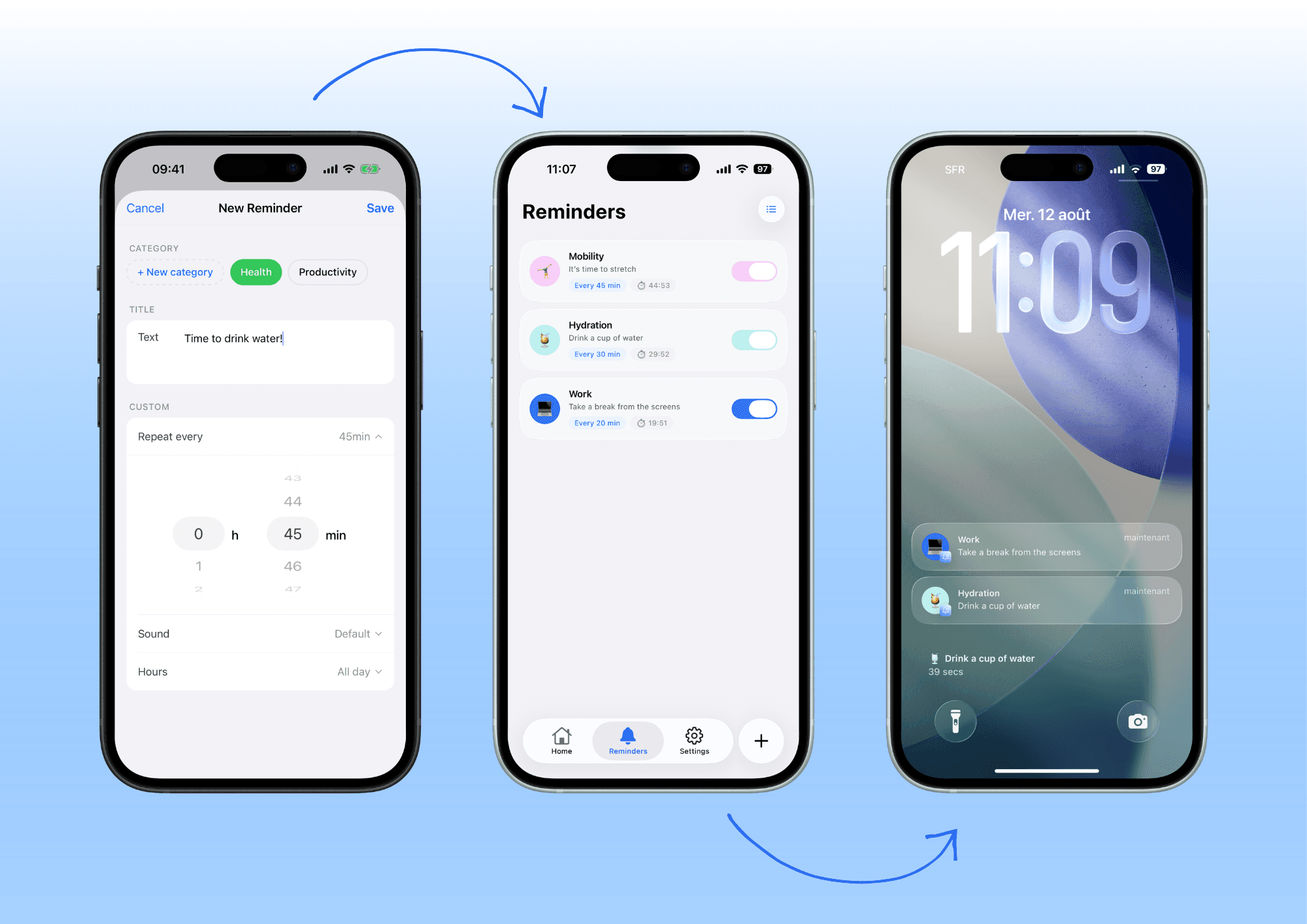
With Pushmi, you set the interval in minutes or hours: 30 minutes, 45 minutes, two hours, whatever you need. Creating a reminder takes just a few seconds, with no endless menus.
So you can start at 30 minutes, then adjust if the pace feels too tight or too loose.
A reminder you actually notice
A generic reminder quickly gets ignored. Pushmi lets you write the exact message you want to read:
- Custom message: "Get up and walk for two minutes" speaks to you more than a plain "Reminder."
- Chosen ringtone: pick a ringtone from several options to set this reminder apart from your other notifications.
Multiple reminders, neatly organized
You can run several reminders at once, for example one for water every hour and one for posture every 30 minutes.
- Categories: group them by theme, like "Health" or "Work."
- Emoji: one emoji per category, so you can recognize each group at a glance.
See what's running without opening the app
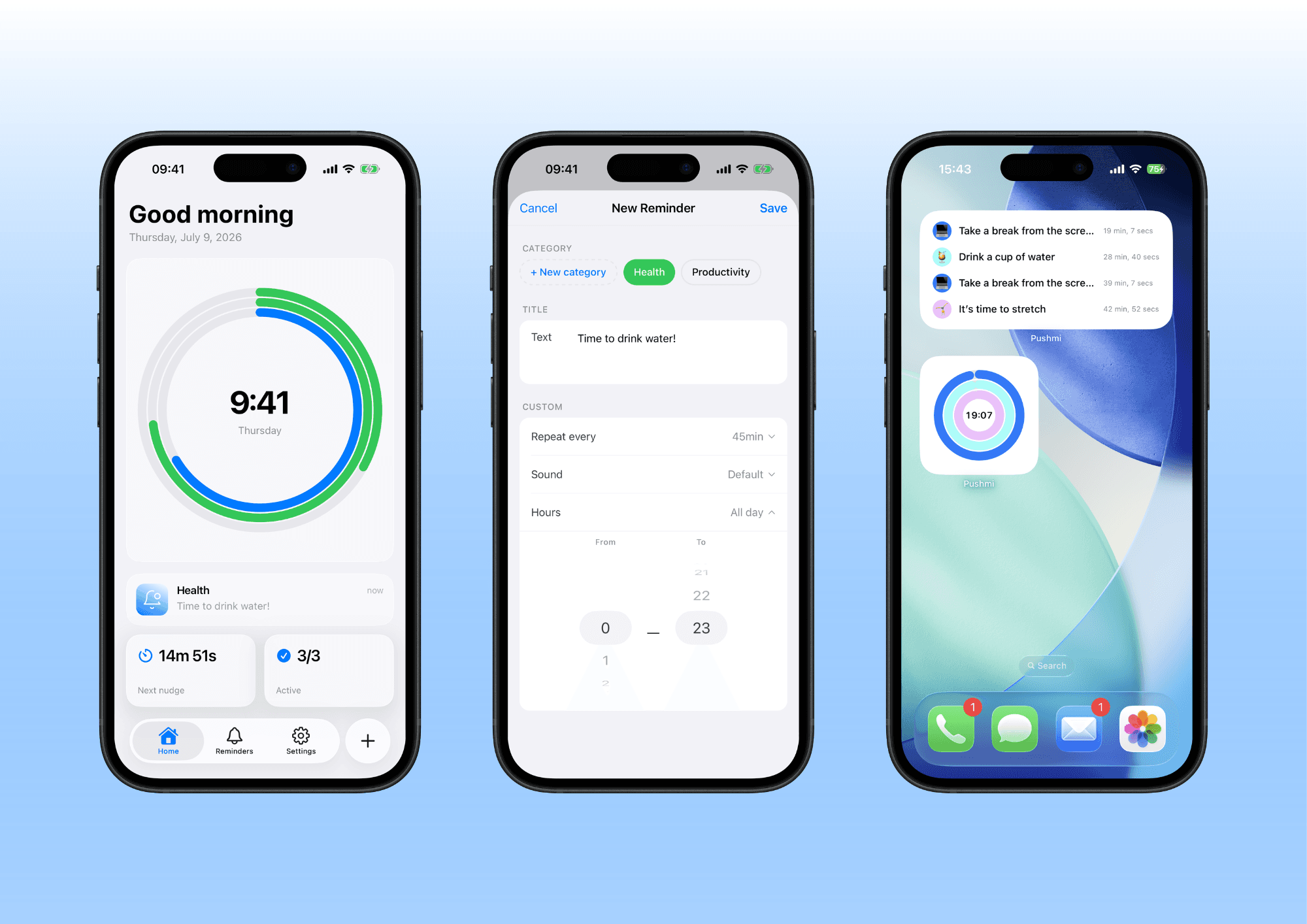
- Widgets: on the lock screen or home screen, they show your active reminders.
- Home rings: each active reminder has its own ring that empties until the next notification.
On the privacy side, Pushmi collects no data and doesn't track you.
If your goal goes beyond a simple reminder, take the time to read about how to build lasting habits, then start your first interval.
Write the specific action to take in the message, not just the topic. You'll know what to do the moment the notification appears.
Your next step
Remember this: it's not the iPhone that builds the habit, it's repeating the same action at the same time, day after day. That repetition is exactly what Pushmi handles for you: you pick the 30-minute interval, write the exact message you want to see, and the reminder keeps coming back without you ever having to reschedule anything.
Frequently Asked Questions
How many reminders can you create in the iPhone Clock app?
You can create as many alarms as you like, but each one goes off at a fixed time. To cover a whole day at 30-minute intervals, you'd have to add a separate alarm for every slot by hand. It works, but it quickly becomes a hassle to manage, and to switch off in the evening.
Does a reminder every 30 minutes drain your iPhone battery?
No, a scheduled notification uses very little power. Your phone doesn't need to stay active the whole time to display it: the system triggers it at the right moment. What really drains your battery is the screen being on, not the reminder itself.
Do reminders still go off when a Focus mode is on?
Not necessarily: a Focus mode can silence notifications from apps you haven't allowed. Alarms from the Clock app, however, usually still go off. If you use a reminders app, add it to the allowed apps in your Focus mode settings.
Every 30 minutes — isn't that too often?
It depends on what you're trying to do: for drinking water, moving around, or fixing your posture, every half hour is a reasonable pace. If you start dismissing the reminder without reading it, that's a sign you should space them out or change the message. The right interval is the one you actually respond to.
How long should you keep a reminder before a habit becomes automatic?
There's no single timeframe: the study by Lally and colleagues (UCL, 2009) found wide variation from one person to the next and from one habit to another. Think in weeks rather than days, and keep the reminder on until the action comes naturally. You can then gradually space out the notifications.