
To apply the Pomodoro Technique, you simply divide your work into focused time sessions separated by short breaks. This pragmatic method works because it prevents vigilance from collapsing by cutting the work before your brain naturally exhausts itself.
This article guides you step-by-step on using timers and active breaks, whether you're working remotely or prefer deep work. It then offers a concrete tip for automating these cycles with minimal effort.
Key Takeaways:
- Start with a 25-minute focused work interval.
- Take a 5-minute active break after each session.
- Repeat the cycle up to four times before taking a long break.
- Adjust the durations if you find the standard times too rigid.
Why the Pomodoro Technique Boosts Focus?
The method divides work time into 25-minute blocks followed by breaks, preventing mental fatigue by cutting the work before the brain gets exhausted.
Short Cycles Protect Your Attention
Studies show that short breaks of 10 minutes or less boost energy and reduce fatigue in workers. By reversing the logic of duration, Pomodoro forces interruptions before vigilance drops.
Conversely, after a break, it takes an average of 23 minutes and 15 seconds to regain your flow state, which is why it's crucial not to extend breaks. Extending a break beyond this threshold makes it even harder to rebuild your concentration for the next cycle.
A Gentle Alternative to Get Started
The principle is to create short cycles to maintain alertness and avoid sitting too long. It's a gentler alternative to Deep Work for beginners, as it accepts distractions instead of fighting them head-on. This pragmatic approach works even if your attention wanders frequently. Don't hesitate to discover how to stay focused at work.
Step 1: Prepare Your Environment and Task
Before launching your first timer, ensure your workspace is ready to accommodate an intense work session without external interruptions. Meticulous preparation is the key to preventing your focus from dissipating immediately after the session begins.
Choose a Specific Task
Start by identifying a single, achievable goal that you can complete entirely within a 25-minute window. Avoid setting yourself a project that is too broad, as the brain struggles to focus on vague details during the timer's duration.
Remove Potential Distractions
Place your phone in another room or enable "Do Not Disturb" mode to cut off incessant notifications. Frequent interruptions disrupt concentration and increase the time needed to return to your task, as some studies show.
Gather All Necessary Materials
Collect all documents, tools, or resources you will need right beside you. This prevents you from looking up to search for information, which breaks your attention flow and prolongs recovery time.
Clearly Define the Stop Criterion
State the exact condition that will signal the end of your session, such as "I've drafted the first three sections" or "I've finished this specific report." This concrete criterion gives you certainty about when to stop the timer, avoiding anxiety related to the remaining time.
To delve deeper into the topics of concentration and workplace ergonomics, check out our article on healthy habits at the office.
Step 2: Start the Timer and Work
Once your environment is ready, start the timer for 25 minutes and focus exclusively on the chosen task. If a distraction arises, jot it down quickly on a piece of paper before returning immediately to your work, without stopping to deal with it.
Handling Interruptions Without Stopping
The mind tends to wander, which is normal: studies show that attention switches to another screen on average every 47 seconds. Gloria Mark, UC Irvine Accepting that this happens is the first step. The goal is to get back on track as quickly as possible.
The Crucial Move at the Bell
Stop the timer exactly when it rings, even if the task isn't finished. This precise moment constitutes the break, regardless of your progress. To maintain momentum, keep in mind that interruptions can take nearly 23 minutes to overcome after the fact. Gloria Mark, UC Irvine
For Simple Break Management
If you need a reminder to take regular breaks, such as with the Pomodoro technique, you can build a simple habit. For example, a routine to remember to drink water helps structure these recovery moments.
For Alternative Organization Options
If you prefer other tools to manage your breaks, solutions like reminder apps for organizing breaks exist. They can prove useful depending on your management preferences.
Step 3: Take a Short, Active Break
Strictly adhering to a 5 to 10-minute break is crucial to allow your brain to recover after the intensity of work. A study published by Stanford University shows that interruptions can cost approximately 23 minutes and 15 seconds before concentration is regained, making short and frequent breaks essential.
Stand Up and Move
- Standing up from your chair and taking a quick 5-minute walk every 30 minutes of sitting significantly reduces physical fatigue and improves mood.
- Avoid staying frozen in the same position, as blood circulation slows down and increases the feeling of heaviness.
Avoid Screens During the Break
- Social media, email, or videos create a new visual demand that prevents the brain from recharging.
- This practice preserves mental energy for the next task, unlike another break that would have you scrolling through posts.
Use the Break for Gentle Movement
- Stretch your shoulders or drink a glass of water to rehydrate your body and release tension.
- These simple actions act as an immediate reset for your nervous system.
Step 4: Manage the Long Break After 4 Cycles
After four work sessions, it's crucial to take a longer break—lasting 15 to 30 minutes—to allow your brain to recharge. This is the perfect time to have lunch, stretch your body, or engage in light physical activity, but you must absolutely avoid checking emails or starting a new complex task.
Take a Truly Detached Break
- Do not work during this break to ensure complete recovery of your attention.
- Use this time to look out the window or take a deep breath.
Start a New Cycle
Once your break is over, launch a new cycle of four Pomodoros to maintain your productivity over the long term.
Why Is This Break Essential?
Studies show that interruptions cost time, and a long break helps restore focus after several periods of intense concentration.
Tip to Avoid Forgetting the Break
Use a tool that sends you a precise reminder when it's time to take a break. Set an alert that sounds at the end of the four cycles to encourage you to disconnect from screens and truly rest. If you're looking to refine your time management or explore other approaches, check out our articles on concentration techniques at work. To create a similar rest routine, you can also consult our guide on how to build a habit of drinking water.
How to Adapt the Method If It Doesn't Suit You?
The Pomodoro Technique is not an unchangeable law: if 25-minute blocks feel too rigid, adjust the durations to match your own work rhythm to maintain effectiveness.
Adjust Durations Based on Your Needs
- For long tasks: Start with 15-minute blocks to get used to the technique, then gradually extend the work duration to 50 minutes with a 10-minute break.
- For complex tasks: If you feel your concentration waning before 25 minutes, reduce the initial duration or slightly increase the work time while keeping breaks frequent.
Consistency Is Key
What truly matters is the consistency of breaks rather than strictly adhering to standard durations. This helps break through mental fatigue and maintain sustained attention over the long term.
Don't Forget to Take Breaks
If you struggle to keep track of time on your own, use reminder tools to ensure you take breaks at regular intervals. Start with shorter blocks if necessary; the important thing is the consistency of your breaks.
How to Use Pushmi to Honor Your Breaks
If physical timers feel rigid or difficult to manage, Pushmi allows you to create an automatic break routine that seamlessly integrates into your workflow. The app transforms the 25-minute logic into recurring reminders that sound exactly at the end of each block, helping you maintain a steady rhythm without manual interruption.
Set Up a Recurring Break Routine
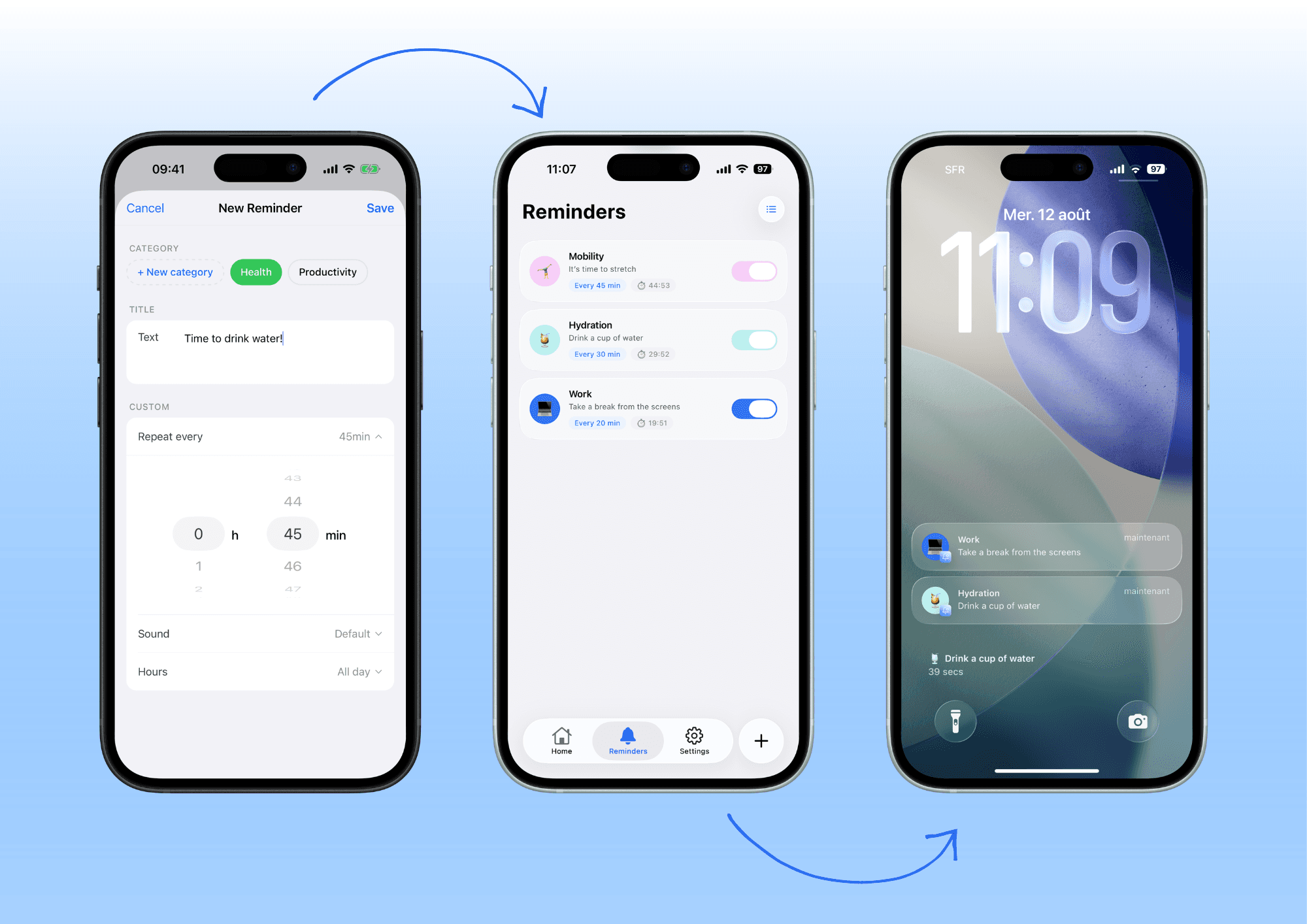
- Precise Reminder: Set a reminder that repeats every 25 minutes. This is the only way to stick to the timing without needing to touch a clock.
- Prompt to Look Away: Write a personalized message in the reminder, such as "Take a real break now," to remind you to step away from the screen.
- Distinct Sound: Choose a specific sound for break reminders so you don't confuse them with work notifications.
Visualize Your Progress
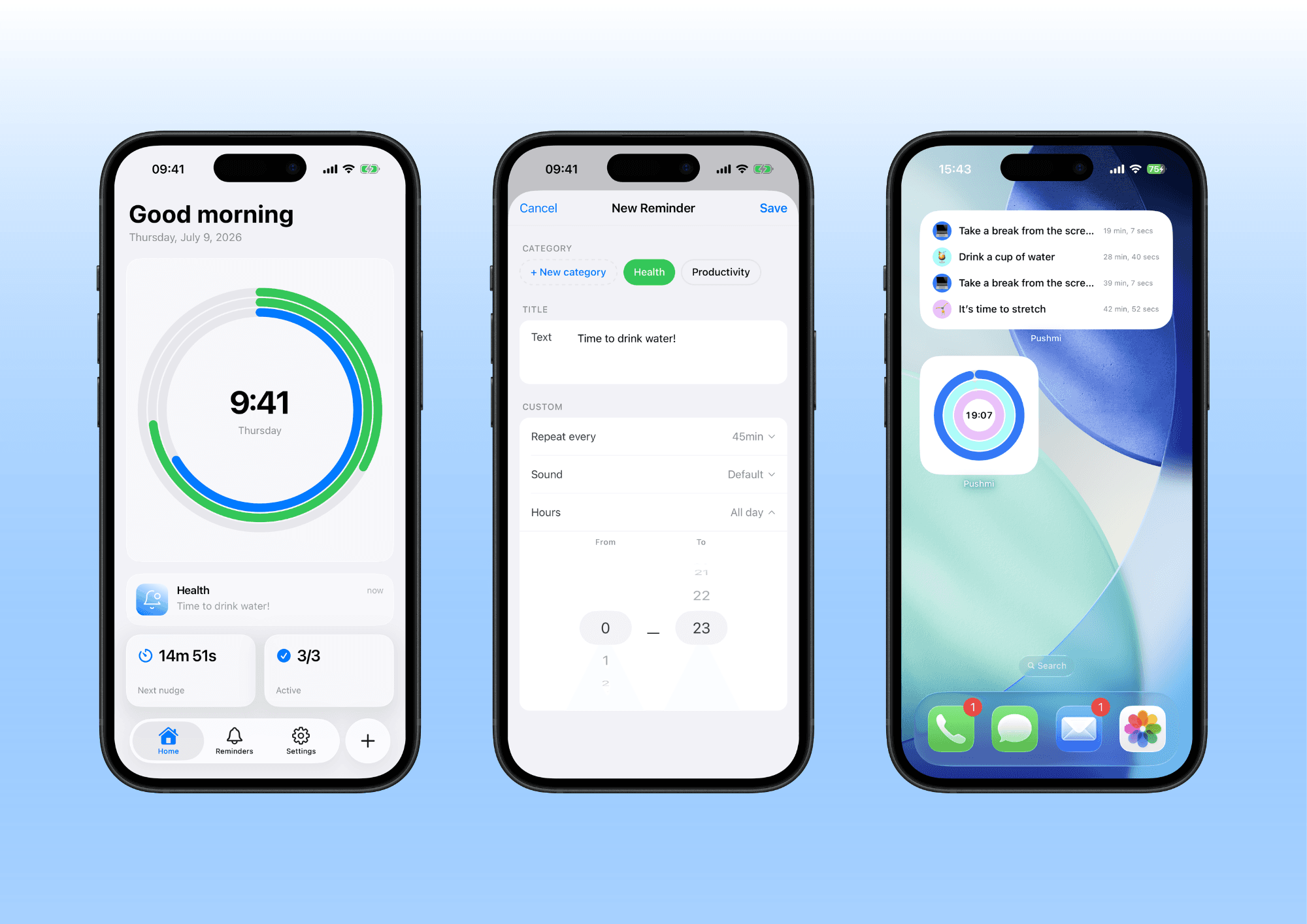
Add widgets to your home or lock screen to quickly see how many pomodoros remain. This gives you an overview of your routine without needing to open the app, minimizing potential distractions. Set a reminder that sounds exactly at the end of each work block to automate your active breaks.
In conclusion
Remember that your attention returns with difficulty after each distraction, and that unexpected notifications are the main culprit. Pushmi helps you block these interruptions by creating custom reminders that invite you to focus on what truly matters, at your own pace.
Frequently Asked Questions
What is the standard duration of a pomodoro?
The classic duration is 25 minutes of focused work followed by a 5-minute break. This short structure helps maintain sharp focus before switching screens. However, you can adjust these times to suit your personal work rhythm.
What if I don't finish my task in 25 minutes?
That's normal: the technique is designed to help you move forward in short cycles rather than forcing you to finish a large project all at once. If the task remains incomplete, you simply move on to the next break to pick up where you left off later.
Do I always need to take a 5-minute break?
Ideally, take short breaks after each cycle, but you can extend them to 15 or 30 minutes after four consecutive cycles. What matters is to move around and switch screens to avoid visual and mental fatigue.
Does the Pomodoro Technique Work for Remote Work?
Yes, it's even highly effective at home, as it helps you establish clear boundaries between your work time and your downtime. This consistent structure compensates for the lack of physical separation from the office and combats household distractions.
What's the Difference Between Pomodoro and Deep Work?
The Pomodoro Technique uses scheduled breaks to manage fatigue, whereas Deep Work prioritizes long, uninterrupted sessions. Both approaches aim to enhance focus, but they rely on opposing time management mechanisms.