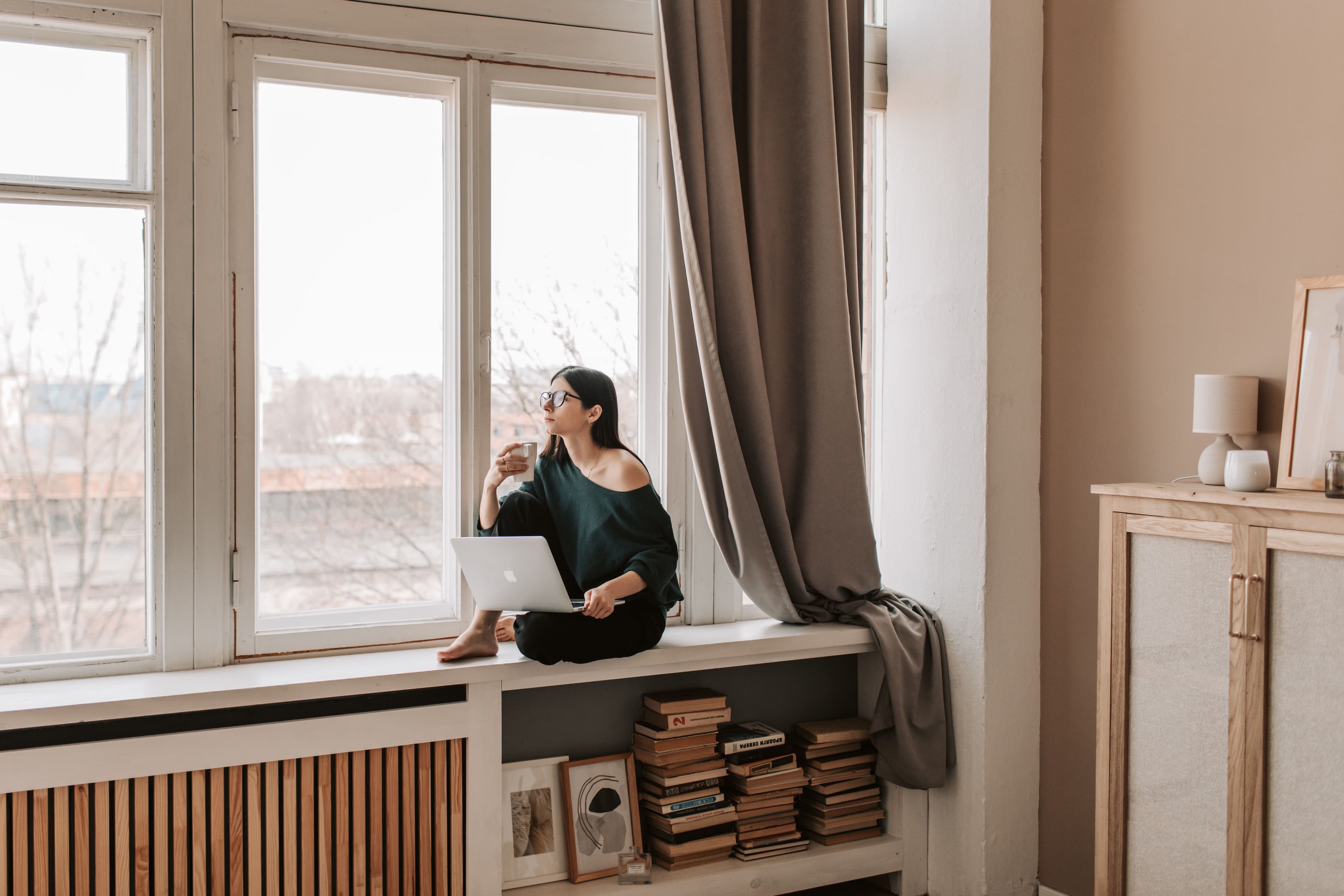
The best desk stretches are the ones you can do in your work clothes, sitting or standing, in under two minutes: neck tilts, chin tucks, shoulder rolls, chest openers, seated twists, cat-cow, wrist stretches, and a standing lunge for your hips. Done regularly throughout the day, they relieve the areas that screens and back-to-back meetings stiffen the most.
This guide is for you if you spend your days in front of a computer. Each move is grouped by body area, with its ideal use and its limits, then brought together in a ready-to-use routine.
Key takeaways:
- 8 simple moves, no equipment or workout clothes needed
- A complete routine in 2 minutes
- Consistency matters more than intensity
- The real challenge: remembering to move often
The best office stretches at a glance
The best desk stretches target six areas: the neck, shoulders, upper back, wrists, hips, and legs. These are the parts of your body that take the brunt of long hours spent at a screen, typing, and sitting through meetings.
Here's the lineup, organized by area, along with the situation where each move will help you most.
| Feature | Stretching | Ideal for |
|---|---|---|
| Nape | Lateral tilt | Stiff neck in the late afternoon |
| Nape | Chin tuck | Head jutting forward toward the screen |
| Shoulders | Shoulder Rolls | Tense, hunched shoulders |
| Shoulders | Chest Opener | Hunched over the keyboard |
| Back | Seated Chair Twist | Stiffness After a Long Meeting |
| Back | Seated cat-cow | Stiff upper back |
| Wrists | Flexor and Extensor Stretches | Keyboard and Mouse Wrist Rests |
| Hips and legs | Standing Lunge | Tight Hips from Sitting |
Why should you care? A 2023 Columbia University study found that walking for 5 minutes every 30 minutes of sitting cut post-meal blood sugar spikes by 58% and lowered blood pressure by 4 to 5 points, compared with sitting all day.
That study looked at walking, not stretching. But it reinforces a simple idea: regularly breaking up long periods of sitting matters.
That's the real takeaway from this list. An imperfect move done often throughout the day will do you more good than a perfect routine you never actually do. There's no need to match a yoga teacher's range of motion. Move gently, don't push it, and stop if something hurts.
If pain persists, talk to a healthcare professional. And if you want to go beyond stretching (hydration, posture, eye care), check out the complete guide to healthy habits at work.
How we chose these stretches
Every move in this selection passes three simple tests. You can do it in your work clothes without leaving your desk. It takes just a few seconds, and it targets what screens and chairs really wear down.
Doable anywhere, no equipment needed
No mat, no workout clothes, no lying on the floor between meetings. Every stretch can be done sitting in your chair or standing next to your desk.
They're also low-key enough for an open-plan office. You can roll your shoulders or do a seated twist without the whole floor turning to stare.
Short enough to fit into 2 minutes
Each move takes less than 30 seconds. That's what lets you combine them into a 2-minute routine, which you'll find later in this article.
A long, perfect stretch you never do is less useful than a quick move you repeat several times a day.
Targeted at the areas screen work strains
The selection focuses on the areas that sitting at a computer puts under the most strain:
- Neck: your head creeping forward toward the screen as the hours go by.
- Shoulders and chest: arms reaching for the keyboard, upper back rounding forward.
- Back: your back staying locked in the same position.
- Wrists and forearms: constant mousing and typing.
- Hips and legs: hips bent in your chair for hours on end.
Stretches complement a good setup; they don't replace it. To adjust your screen, your chair and your habits, check out the mistakes that ruin your posture at the office.
General advice, not treatment
These moves are common healthy-living tips, not a rehabilitation program. Stretch gently, without forcing or bouncing.
If a movement causes pain, stop. If pain persists, see a doctor or a physical therapist.
Neck Stretches: Side Tilt and Chin Tuck
For a stiff neck after hours at a screen, two moves are all you need: the side tilt, which stretches the sides of your neck, and the chin tuck, which brings your head back over your shoulders. Both can be done sitting down, without your coworkers noticing.
It's no coincidence that your neck is the first to complain. According to a review by Jun et al. (2017), office workers report more neck pain than people in other occupations, with a one-year prevalence ranging from 17.7% to 63% depending on the study.
Side Neck Tilt
Best for: tension along the sides of your neck and across the tops of your shoulders.
- Sit up straight with your feet flat and your shoulders relaxed.
- Slowly lower your right ear toward your right shoulder, without lifting the shoulder.
- Hold for 15 to 20 seconds, breathing calmly.
- Return to center, then repeat on the other side.
You should feel a gentle stretch, never pain. There's no need to pull your head with your hand.
Chin Tuck
Best for: a head that drifts forward toward the screen as the day goes on.
- Look straight ahead, with your back against the backrest if possible.
- Gently draw your chin back, as if making a double chin, without tilting your head down.
- Hold for 3 to 5 seconds, then release.
- Repeat 8 to 10 times, slowly.
Their Limits
These stretches bring relief, but they won't fix a poorly positioned screen. If your monitor is too low, you'll slip back into the same posture five minutes later. Raise the top of your screen to eye level, and take a look at the mistakes that ruin your posture at the office to sort out the rest.
If the pain persists, radiates down your arm, or comes with tingling, see a healthcare professional rather than pushing through it. Before you stretch, raise your screen to eye level: that's what keeps your neck from stiffening up again.
Shoulder Stretches: Rolls and Chest Opener
If your shoulders creep up toward your ears and round forward over the keyboard, two simple moves are all you need: backward shoulder rolls, followed by a chest opener with your hands clasped behind your back. You can do them sitting or standing, right in your work clothes.
Ideal for: tense shoulders after back-to-back meetings, a chest that tightens from hours of typing, and that "hunched back" feeling at the end of the day.
Backward Shoulder Rolls
- Sit up straight, feet flat on the floor, arms relaxed at your sides.
- Lift your shoulders toward your ears as you breathe in.
- Roll them back and then down as you breathe out, as if drawing your shoulder blades together.
- Repeat 8 to 10 times, slowly, without forcing the range of motion.
Direction matters: rolling backward counteracts the hunched posture your screen puts you in all day.
Chest Opener with Hands Clasped Behind Your Back
- Interlace your fingers behind your back, at about hip level (if you're seated, scoot to the edge of your chair).
- Gently straighten your arms and squeeze your shoulder blades together.
- Open your chest forward, keeping your chin parallel to the floor and without arching your lower back.
- Hold for 15 to 20 seconds, breathing calmly, then release.
If your hands don't reach each other, hold a belt, a scarf, or simply the back of your chair.
The Limits of These Stretches
| Feature | Rear Bearings | Chest Opener |
|---|---|---|
| Position | Sitting or standing | Standing or perched on the edge of the chair |
| Duration | About 20 seconds | 15 to 20 seconds |
| To adapt if | The shoulder catches or clicks painfully | Front shoulder pain |
These stretches should pull a little, but never hurt. If one shoulder is painful, reduce the range of motion or skip that move, and see a healthcare professional if the pain persists. They also aren't a substitute for a good workstation setup: for that, check out the mistakes that ruin your posture at work. During a call, just ask yourself: "Are my shoulders up by my ears?" If they are, let them drop and do three backward rolls.
Seated Back Stretches: Chair Twist and Seated Cat-Cow
To loosen a back that's gone stiff after hours of sitting, two simple moves are all you need: a gentle twist while holding the chair back, followed by a few rounds of rounding and arching your back. The first works your upper back, while the second wakes up your entire spine, all the way down to your lower back.
Ideal for: a lower and upper back that stiffen up after a morning of meetings or a long stretch in front of the screen.
The Chair Twist
- Sit on the edge of the seat, with both feet flat on the floor.
- Lengthen your spine as you breathe in, as if a string were pulling the top of your head upward.
- Turn your upper body to the right as you breathe out, with your right hand on the chair back and your left hand on your right thigh.
- Hold for three or four breaths, without pulling with your arms: the rotation comes from your torso.
- Return to center, then repeat the same movement on the other side.
Seated Cat-Cow
- Place your hands on your knees, with your back straight.
- Round your back as you breathe out: chin toward your chest, belly button drawn in.
- Arch your back as you breathe in: chest forward, gaze slightly upward.
- Alternate slowly, five to eight times, in time with your breathing.
Limits to Keep in Mind
- Rolling chair: it may swivel or roll back during the twist. Plant your feet firmly on the floor, or do the exercise on a stationary chair if you have one.
- Range of motion: stay within a comfortable range. A twist doesn't need to be deep to be effective.
- Pain: if a movement triggers pain, stop and talk to a healthcare professional.
These stretches bring immediate relief, but a back that keeps stiffening up often comes down to how you sit. To tackle the problem at its source, take a look at the mistakes that ruin your posture at the office. Breathe out as you twist or round your back, and breathe in as you lengthen your spine. This rhythm keeps you from straining and makes the movement smoother.
Wrist and Forearm Stretches for Computer Users
Your wrists only need two moves: extension and flexion, with your arm stretched out in front of you. They relax your forearms, which work nonstop whenever you type or hold a mouse.
Ideal for: using a mouse and keyboard all day, long sessions of emails or spreadsheets.
Wrist Extension
- Stretch one arm out in front of you, palm facing down, elbow straight.
- Let your hand drop toward the floor, fingers pointing down.
- With your other hand, gently pull your fingers back toward you.
- Hold for a few seconds while breathing, then switch sides.
You'll feel the stretch along the top of your forearm, the part that keeps your hands raised above the keyboard.
Wrist Flexion
- Stretch your arm out, this time with your palm facing up.
- Point your fingers toward the floor.
- Gently pull your fingers toward you with your other hand.
- Hold for a few seconds, then switch arms.
The stretch is felt on the underside of your forearm, where the muscles that close your hand and grip the mouse are.
| Feature | Extension | Bending |
|---|---|---|
| Palm position | Down | Back to top |
| Stretched area | Top of the forearm | Inner forearm |
| Can be done seated | Yes | Yes |
| Quiet in meetings | Yes | Yes |
Limitations
Keep the stretch gentle: a light tension, never pain. Don't force it by pulling on your fingers.
These moves don't replace a properly set-up workstation. If your wrists are bent upward all day, also check out the mistakes that ruin your posture at your desk.
Limitation: if tingling, numbness, or pain persists, stop stretching and see a healthcare professional. After a batch of emails, open and close your hands several times before reaching for the mouse again. It takes three seconds and breaks up a stiff posture.
Hip and Leg Stretches: Better on Your Feet
For your hips and legs, the most effective thing you can do is stand up. After hours of sitting, your hips stay flexed and blood doesn't circulate as well through your legs. A standing stretch gets everything going again far better than anything you can do from your chair.
Best for: stiff hips after a long meeting, heavy or numb legs in the late afternoon.
The 3 Moves to Remember
- Gentle standing lunge: take a small step back, keep your upper body upright and tuck your pelvis slightly. You'll feel the stretch at the front of your back hip. Hold for about twenty seconds, then switch sides.
- Calf stretch against the desk: place your hands on the edge of your desk and step one leg back, keeping it straight with your heel firmly on the floor. Lean forward gently until you feel your calf working.
- Seated figure 4: if you can't get up, rest your right ankle on your left knee, keep your back straight, then lean forward slightly. It's the discreet option for your glutes and hips.
Why Moving Matters as Much as Stretching
These moves work best when paired with a few steps. In the Columbia University study (2023), every walking schedule tested except one minute per hour reduced fatigue and improved mood. Getting up to stretch is already a first step toward that movement.
The Catch
These stretches require you to leave your chair, so they're a little less discreet in an open-plan office. The figure 4 remains your fallback in the middle of a video call. To keep the stiffness from coming right back as soon as you sit down, also take a look at the mistakes that ruin your posture at your desk.
If your hip or knee hurts during the stretch, stop and talk to a healthcare professional. Every time you get up for the printer or a coffee, add ten seconds of calf stretching against your desk on your way back.
The 2-minute desk stretching routine
Work through five moves, from your neck down to your legs, without leaving your desk. Allow about 20 to 25 seconds per move and breathe slowly, and you'll finish in about 2 minutes.
The ready-to-go sequence
- Neck: gently tilt your ear toward your shoulder on each side, then tuck your chin in a few times.
- Shoulders: do five backward shoulder rolls, then clasp your hands behind your back to open up your chest.
- Back: while seated, hold the back of your chair and do a gentle twist to the right, then to the left.
- Wrists: with your arm straight out and your palm facing forward, gently pull your fingers back toward you, then switch sides.
- Legs: stand up, take a step back and press your heel into the floor to stretch your calf.
You can do it between meetings or during a break with the Pomodoro Technique.
Add a break for your eyes
Your eyes get tired in front of a screen too. The American Optometric Association recommends the 20-20-20 rule: every 20 minutes, look at something about 20 feet (6 meters) away for 20 seconds.
Add it to the end of your routine: look out the window or across the room while you catch your breath.
Common mistakes
- Pushing too hard: a stretch should feel like a gentle pull, never pain. If pain comes on or doesn't go away, stop and talk to a healthcare professional.
- Holding your breath: holding your breath tenses the very muscles you're trying to relax. Breathe out as you ease into the stretch.
- Stretching only once a day: one long session in the evening won't make up for hours of sitting still. Short breaks spread throughout the day work better.
For tips on hydration, posture and lighting, check out the complete guide to healthy habits at work. Go a little deeper with each exhale, then release. Your body relaxes more easily this way than when you pull all at once.
How to Remember to Stretch at Your Desk All Day
If you want to actually stretch, don't rely on your memory. Tie the habit to a moment that already happens in your day, or let your phone handle the reminder. The rest takes care of itself.
The Real Obstacle: Focus
You know the moves, and you know they help. But once you dive into a project, time vanishes.
You look up, it's 5 p.m., and your neck lets you know it. It's not a lack of willpower: a focused brain tunes out everything that isn't the task at hand.
App-Free Solutions
The simplest approach is to attach stretching to a habit you already have:
- A phone call: take the call standing up, then do two shoulder rolls as you hang up.
- A glass of water: every time you go to refill your glass, do a seated twist when you get back.
- The end of a Pomodoro: the 5-minute break in the Pomodoro Technique is just right for the 2-minute routine.
These triggers work well as long as your day follows a regular pattern. On days packed with back-to-back meetings, they fall by the wayside.
A Reminder That Comes Back on Its Own with Pushmi
That's where a recurring reminder helps. With Pushmi, you can set up a reminder in seconds that repeats at whatever interval you choose, for example every 30 minutes.
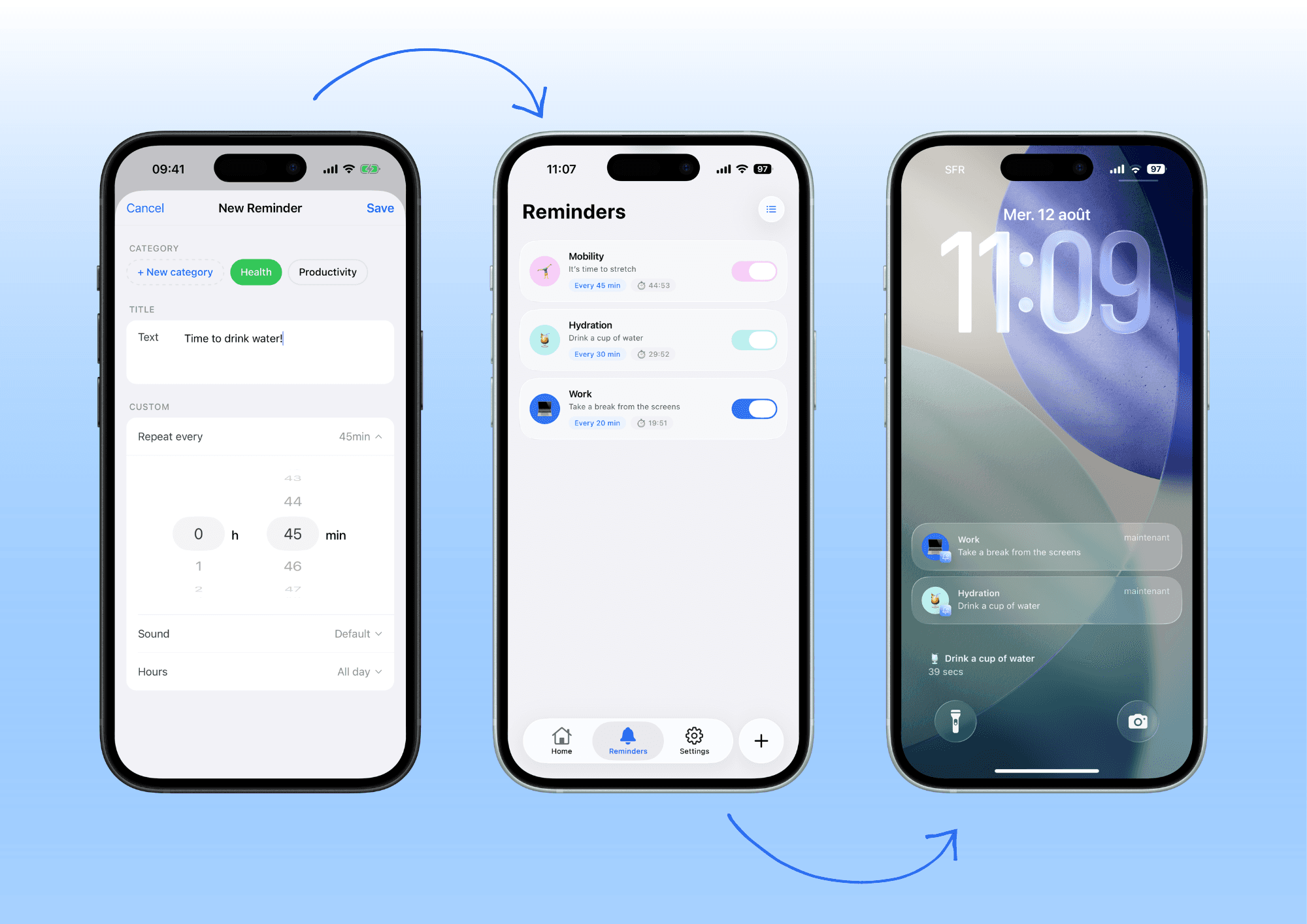
Write the exact message that will get you moving, like "Neck + shoulders, 2 min." A specific reminder is easier to follow than a vague "move."
To set it up:
- Create a "Health" category and give it its own emoji.
- Pick a distinct sound so you can recognize the reminder without looking at the screen.
- Add the widget to your lock screen to see your active reminders at a glance.
The app collects no data and doesn't track you.
Your next step
The best stretch is the one you actually do, and the hardest part isn't the movement itself, it's remembering to do it between meetings. With Pushmi, you can set up a reminder in seconds that repeats every 30 minutes (or as often as you like), with your own message, such as "Neck, shoulders, wrists: 2 minutes." Let Pushmi take care of you while you focus on what you do best.
Frequently Asked Questions
How many times a day should you stretch at your desk?
Several times a day, in short breaks rather than one long session. A Columbia University study (2023) shows the benefits of walking for 5 minutes every 30 minutes, and a 2-minute routine fits easily into those breaks. The simplest approach is to tie your stretches to fixed moments: after a meeting, before a call, or when you get back from your coffee break.
Can you stretch at your desk without anyone noticing?
Yes, most of the stretches in this article can be done seated, in your work clothes, without drawing attention. Chin tucks, shoulder rolls, wrist stretches and seated twists go almost unnoticed. Save the standing leg stretches for a trip to the coffee machine or a quiet moment.
Is it better to stretch or walk during your break?
Ideally, do both, since one doesn't replace the other. Walking gets your whole body moving and breaks up long periods of sitting, while stretching targets stiff areas like your neck, shoulders, or wrists. If you only have a minute, get up and move: even just standing is better than staying seated.
Should you stretch if your back or neck already hurts?
Take it slowly, and stop if the stretch brings on or worsens pain. A stretch should feel like a gentle pull, never pain. If the pain persists, keeps coming back, or radiates into an arm or leg, see a doctor or physical therapist before continuing.
How long should you hold each stretch?
For an office break, hold each stretch for about 15 to 30 seconds while breathing calmly. For movements like shoulder rolls or cat-cow, do a few slow repetitions instead. Never force a stretch or bounce: consistency matters more than intensity.