The easiest way to remember to feed your pet is to set regular mealtimes and tie them to something you already do every day. Add a visual "fed / not fed" cue and a scheduled reminder, and you'll avoid both forgetting a meal and serving it twice.
This guide is for you if you have a dog or a cat, whether you live alone or share your home with others. It gives you five practical steps to stop forgetting our beloved companions.
Key takeaways:
- Fixed mealtimes make feeding predictable for both you and your pet.
- An existing daily habit works as a natural trigger.
- A visible cue prevents double feeding.
- A clear division of tasks cuts down on duplicate meals in the household.
Why you forget to feed your pet (or feed them twice)
You forget your pet's meal, or give it twice, for the same reason: nothing clearly shows that it has already happened. Without a set time or a visible record, your memory fills in the gaps at random.
You probably know the scene. Your alarm went off late, you're hunting for your keys, your coffee is going cold. Your dog follows you into the kitchen, and the bowl is empty. Then the doubt creeps in: has anyone already fed him this morning?
Two mistakes, one problem
Forgetting a meal and serving it twice seem like opposites, but they stem from the same lack of information. In the first case, everyone assumes someone else took care of it. In the second, everyone takes care of it without knowing.
The extra meal often goes unnoticed, and that's exactly the problem. A few extra kibbles here and there, week after week, eventually add up. So consistency matters just as much as what goes in the bowl.
How forgetting happens
Three situations come up almost every time:
- A shifting routine: you don't feed your pet at the same time on weekdays and weekends, so no habit ever takes hold.
- Several people at home: without a clear division of tasks, the job belongs to everyone, which means it belongs to no one.
- No record of the last meal: an empty bowl tells you nothing. It might be empty because your cat ate, or because nobody filled it.
It's not that you don't care about your pet. A repetitive task done half-awake simply leaves very few memories behind. The same thing happens with all the small tasks of daily life, as this guide on the daily routine for medications, pets, and plants shows.
The good news: each of these three issues can be fixed with one simple step, no special equipment needed.
Step 1: Set regular mealtimes
To stop forgetting meals, give them a fixed time. When feeding always happens at the same moment, it becomes a set appointment in your day, not a chore you do "whenever you remember."
Choose times that suit your pet and your day
Start from your actual schedule, not an ideal one. A time you can't stick to during the week will be forgotten on the first busy day.
- In the morning: pick a time when you're always home, even on rushed days.
- In the evening: go for a consistent time, ideally before your own dinner rather than "when I get home," which varies too much.
- On weekends: keep roughly the same times. Your pet doesn't sleep in, and shifting the schedule throws off your routine.
Your dog or cat will often start asking for food right on time. That's a good sign, but don't rely on it alone: some pets beg even after they've eaten.
Let your vet and the packaging decide portion sizes
How many meals a day and how much food depend on your pet's age, weight, activity level and health. A puppy, a senior cat or a pet being treated for a health condition won't have the same needs.
Use the feeding guidelines on the packaging as a starting point, then ask your vet to fine-tune them. If you notice a loss of appetite, weight gain or weight loss, talk to your vet rather than changing portions on your own.
Write the schedule down somewhere visible
A schedule that only exists in your head is no use to anyone else in the household. Write it down where meals are prepared:
- On the cupboard or the kibble bin, with the times and portion size.
- On the fridge, if several people look after your pet.
This simple note lays the groundwork for an effortless daily routine for medications, pets and plants.
Step 2: Tie mealtime to something you already do
The surest way to never forget to feed your pet is to attach their meal to something you already do without thinking. Feeding stops being one more thing to remember and becomes the natural next step in a moment of your day.
Choose the right anchor
A good anchor is something that happens every day, at roughly the same time, no matter what. A few examples that work well:
- Your morning coffee: while the machine is running, you fill the bowl.
- Getting home from work: you put down your keys, then serve dinner before you even take off your coat.
- Making your own dinner: your dog or cat eats while you cook.
Put it into a simple sentence in your head: "After I start my coffee, I feed the cat." The more specific the sentence, the faster the link forms.
Store the food in the right place
Your anchor works even better when the food is visible right where the action happens. If you tie feeding to your coffee, keep the kibble and the scoop right next to the machine, not at the back of a cupboard.
You see the bag, you remember. There's nothing to go and fetch, so there's no reason to put it off.
Just make sure to keep the food in a sealed container, out of your pet's reach, so they don't help themselves.
Give it time
This link won't become automatic overnight. Expect a few weeks of repetition before it becomes second nature. If you're interested in the topic, here's how to build lasting habits. Keep the scoop and the food right next to your anchor action. Simply seeing them is often enough to prompt the meal.
Step 3: Create a visual "already fed" cue
The easiest way to know whether your pet has eaten is to see it at a glance. A small cue that you change right after the meal settles the question in a second, with nothing to remember.
Choose a cue that works for you
- A flip magnet or card: stick it on the fridge or near the food bowl. One side says "not fed," the other says "fed." Flip it as soon as the bowl is served, then reset it in the evening or the morning.
- A checklist chart: a sheet with the days of the week and a box for each meal. Check it off after every feeding. This is handy if your pet eats twice a day or more.
- Moving the kibble container: keep it on one side before the meal and move it to the other side afterward. It's discreet, but less clear if several people share feeding duties.
What matters is that the cue sits right where you prepare the meal. If you have to go looking for it, you'll eventually forget.
Why this cue also protects your pet's weight
A cat that begs isn't proof that it's hungry. Without a cue, it's easy to fill the bowl "just in case," and those double portions add up fast.
The cue removes that doubt. If the card says "fed," you know the answer is no, even under an insistent stare.
Measure every meal precisely
The cue tells you whether the meal happened, but not how much you served. For the amount, use a measuring cup or a small kitchen scale, and always the same one.
Filling the bowl by eye leads to portions that vary from day to day. With a measuring cup, every meal is identical, no matter who serves it. For the right amount, follow the guidelines on the packaging or ask your veterinarian.
This cue fits easily into a daily routine for medications, pets, and plants. Leave the measuring cup right in the bag or container of kibble. That way, you'll never serve a meal without it.
Step 4: Split feeding duties among everyone at home
When several people share a home, the safest rule is a simple one: one meal, one person in charge. Everyone knows what they're responsible for, and nobody assumes "someone else already took care of it."
Assign one person to each meal
Double feeding rarely comes from carelessness. It comes from confusion: two attentive people each feeding the pet without knowing the other already did.
- Morning: give it to whoever gets up first, the person who's already in the kitchen.
- Evening: assign it to whoever gets home earliest or makes dinner.
- Kids: give them a specific meal rather than a vague job of "helping out," and check in with them at first.
Write down who does what somewhere visible, near the food bowl or on the fridge. A rule mentioned once in passing is quickly forgotten.
Pass along the information when someone is away
A late night out or a meeting that runs long is all it takes to break the system. The person who'll be away gives a heads-up before mealtime, and the other confirms they'll take over.
A quick message in the family group chat is enough: "I won't be home tonight, can you feed the dog?" Wait for a reply before you consider it handled.
Have a plan for weekends and vacations
Schedules shift on weekends, and that's often when meals get missed. Decide ahead of time who handles which meals on Saturday and Sunday, even if your days are less structured.
For vacations, if someone outside the household is coming to feed your pet, leave them written instructions: portions, feeding times, and where the food is kept. If your pet is on medication, the same approach applies, just like when you want to stop forgetting to take your medication. Whenever someone hands off a meal to you, always reply "OK, I've got it." Without a confirmation, assume nothing has been settled.
Step 5: Set a reminder that actually gets your attention
A good reminder stands out from the background noise of your phone. It should tell you exactly what to do and sound in a way you recognize without looking at the screen.
Why the standard alarm ends up ignored
Your phone's alarm does everything: waking you up, timing the pasta, flagging your 2 p.m. meeting. After a few days, your brain files it away with all the other sounds you silence without thinking.
The "Alarm" label doesn't help either. You swipe it away, tell yourself "I'll do it in two minutes," and the bowl stays empty.
A specific reminder in its own category
With Pushmi, you can create a recurring reminder that repeats at the interval you choose, with the exact message you want to see:
- The message: write "Milo's kibble" instead of "Reminder." You'll know what to do as soon as the notification appears.
- The category: create a "Pets" category and give it an emoji, like a paw or a bone, so you can spot it instantly.
- The sound: assign it a sound that's different from your other alerts. You'll know it's your pet's mealtime before you even pull out your phone.
A quick glance at your lock screen
Add a widget to your lock screen. It shows your active reminders, so you can see when the next meal is due without opening the app.
It's also handy for other people in your household who check your phone before filling the bowl.
Keep all your pet's care in one place
If your pet is on medication or needs a walk at a set time, add those reminders to the same "Pets" category. Several reminders can run at once, each with its own message.
The approach is the same as remembering to take your own medication: a clear message, a fixed schedule, and a sound you can't mistake for anything else. Write the exact task in the reminder, for example "Milo's kibble." A specific message is much harder to swipe away than a generic alarm.
Common mistakes when feeding your pet
The most common mistakes don't come from a lack of love. They come from small habits that seem logical at the time: making up for a missed meal, simplifying feeding, or trusting your memory.
Doubling the portion after a missed meal
You skipped the morning meal, so you serve a double portion in the evening. It's tempting, but your pet suddenly gets far more than its stomach is used to handling.
It's better to simply return to the normal schedule at the next meal. If you're unsure what to do, ask your vet.
Leaving the bowl full all the time
Filling the bowl to the brim seems to solve the problem of forgetting. In reality, you no longer know how much your pet eats, or when.
You also lose a valuable signal. A pet that turns its nose up at its food goes unnoticed if the bowl is never empty.
Relying on your memory when your routine changes
A trip, a new work schedule, or a time change is all it takes to break the usual sequence. The habit that served as a trigger disappears, and the meal goes with it.
During these periods, don't count on "I'll remember." Write down the new schedule, let your pet sitter know, and keep a visible reminder.
Ignoring a change in appetite or weight
A pet that eats less, begs for much more, or gains weight for no apparent reason needs professional advice. Only a vet can look for the cause and adjust the portion.
If treatment is prescribed, the same reminder logic applies: you'll find the method in our article on how to stop forgetting to take your medication. If a meal was skipped, serve the usual portion at the next meal rather than a double portion.
Sticking with the routine over time with Pushmi
A feeding routine lasts when it stays visible every day, not just during the first week. Pushmi helps with exactly that: your reminders stay in front of you until the habit becomes second nature.
That shift takes time. It takes repetition before the habit becomes automatic. So missing one doesn't send you back to square one.
See your day at a glance
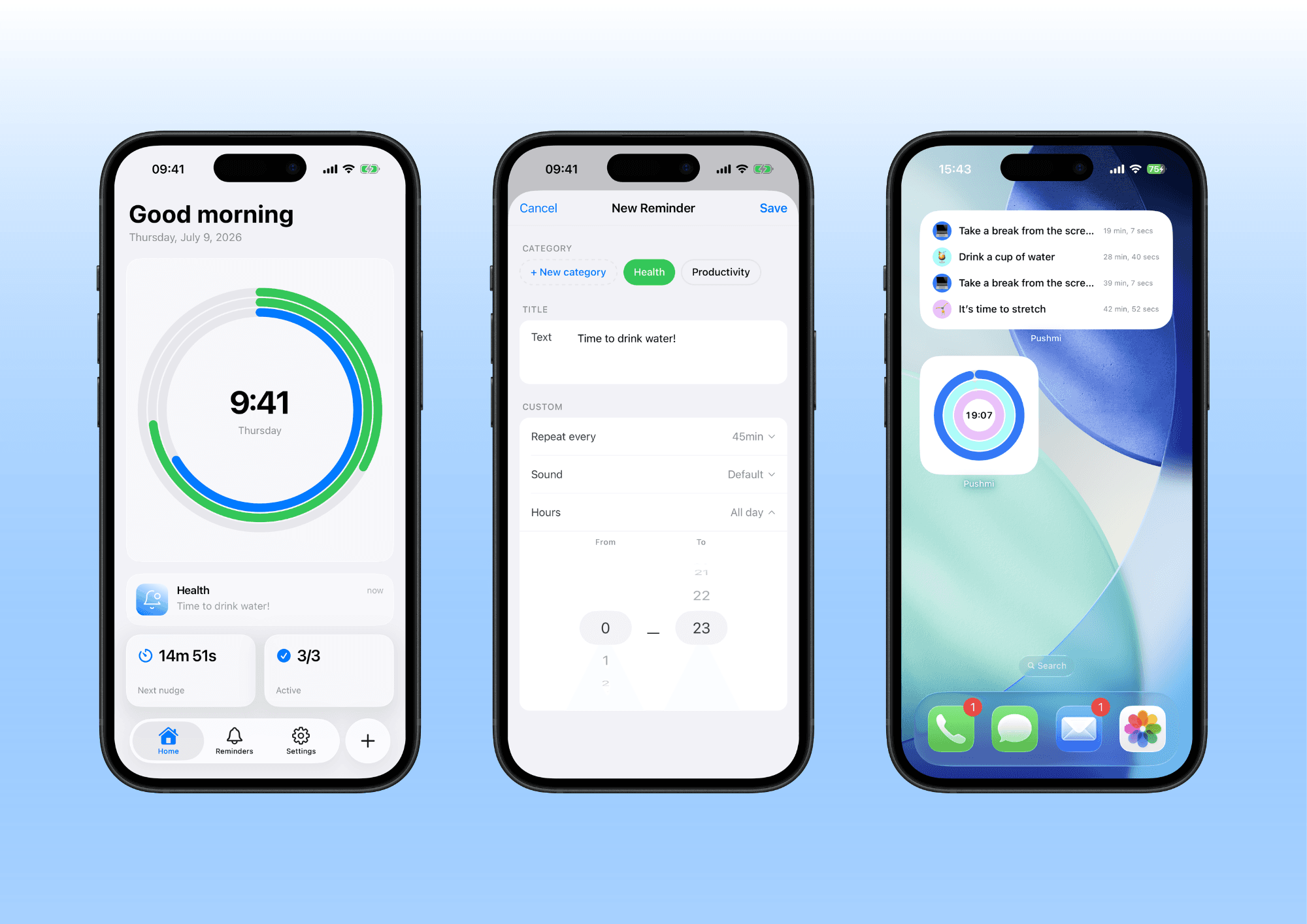
On the home screen, each active reminder has its own ring that shrinks as time passes. You can see right away what's coming up: the evening meal, then the next one.
You can also add a widget to your lock screen. Your reminders stay visible without even opening the app.
Multiple reminders for a single pet
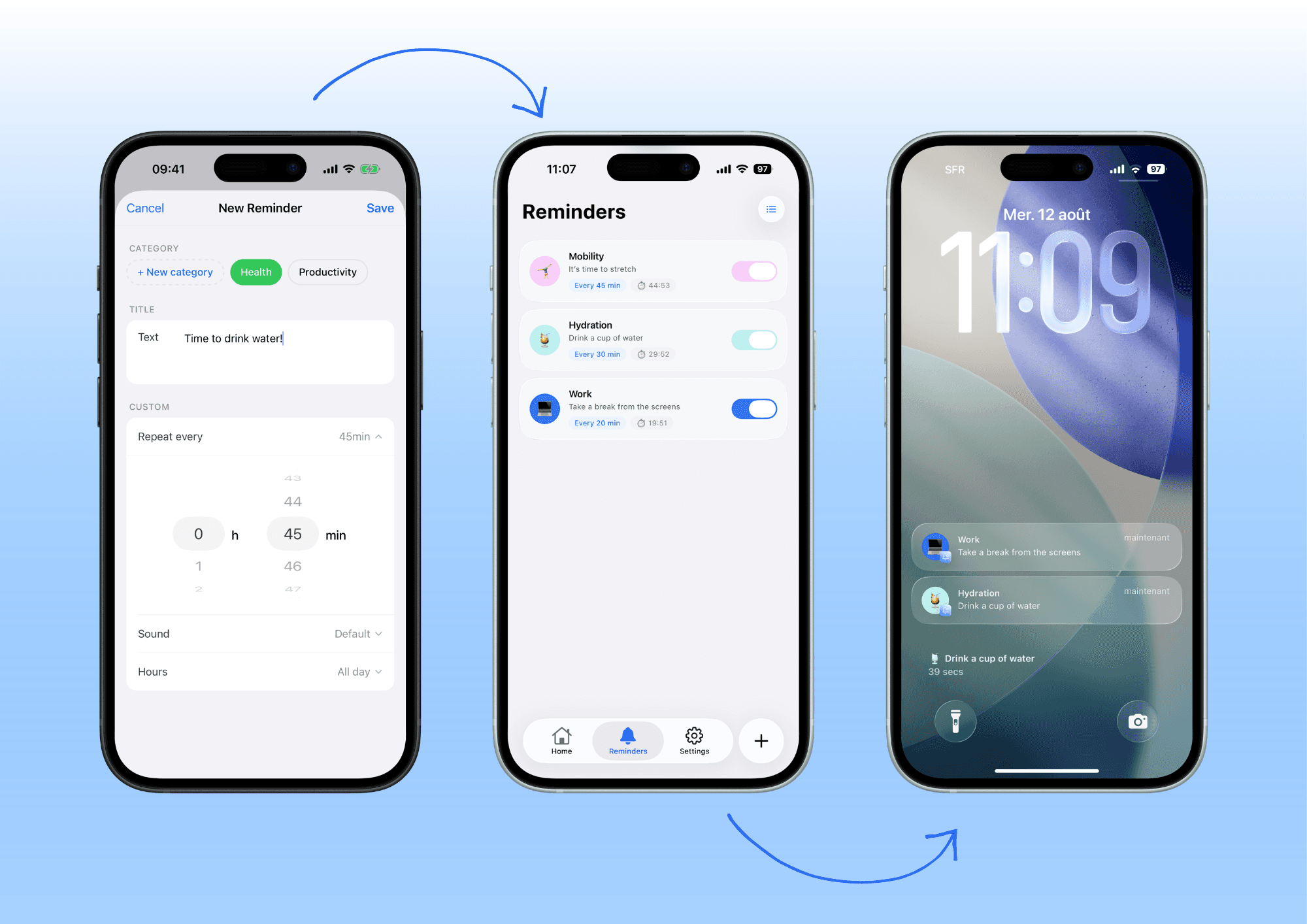
Feeding your pet is about more than just the food bowl. You can run several reminders at the same time, each with its own message:
- Meal: "Felix's kibble, one portion only"
- Fresh water: "Change the water in the bowl"
- Walk: "Take the dog out before dinner"
Group them in an "Pets" category with its own emoji, and choose a sound you'll actually notice. To apply the same method to your plants or medications, check out our daily routine for medications, pets and plants.
Simple and private
A reminder takes just seconds to set up: a message, an interval, and you're done. The app collects no data and doesn't track your activity.
To never again wonder whether the bowl has been filled, download Pushmi for free on the App Store. Include the amount in the reminder message, for example "one portion." Anyone who sees it knows what to serve, with no risk of doubling the meal.
Your next step
If you remember just one thing, make it this: a meal at a set time, assigned to a specific person, prevents both forgotten feedings and double servings. With Pushmi, you can create a recurring reminder in seconds with your own message, like "Cat's dinner, it's your turn," and a sound you'll actually notice, so the routine holds up even on busy days.
Frequently Asked Questions
How many times a day should you feed a dog or a cat?
Most adult dogs eat two meals a day. Cats often prefer several small portions spread throughout the day. Puppies, kittens, and senior pets have different needs, so ask your vet about the right feeding schedule and amount for your pet.
What should I do if I forgot to feed my pet this morning?
Give your pet their normal portion as soon as you remember, without doubling the next meal to make up for it. Then stick to your usual feeding times. If you're unsure, or if missed meals keep happening, talk to your vet.
Is an automatic kibble feeder enough?
It helps a lot with consistency, but it's no substitute for your attention. It can jam, run out of battery or empty without you noticing. Check every day that it has actually dispensed the meals and that your pet is eating normally.
How can I tell if my pet has already been fed when there are several of us at home?
Set up a visual cue that everyone uses, like a magnet you flip on the fridge or a checkbox next to the food bowl. Each person updates it right after serving a meal. Add a clear split of feeding duties, such as one person handling mornings and the other evenings, and you'll never have a meal served twice again.